Showing posts with label How to submit. Show all posts

28 November, 2007

How to submit to Shutterstock?

Things need to be prepare:
  1. Minimum 10 of your best images for the initial review (photographs, illustrations or both) with keywords ready.
  2. Scan a valid acceptable ID (passport, driver's licences...) for verification.


Go to Shutterstock.com (my referral link). Click "Not a Member?Sign Up to make $$$ now!".

  1. The next window will be "Sign up" page. Fill in the necessary info & click on "continue with Sign Up" button.
  2. The follow up window will be "Verifying Your Address" page. This is the time you need to upload your scanned ID to verify your self.
  3. After they have conformed your ID, you can start to upload your 10 best stocks for initial review.
  4. They need ALL the 10 stocks to be pass the initial review. If you can't fail it you only can resubmit after 3 months.
Please find out the file requiements before upload your stock.

How to submit to 123rf.com?

Things need to be prepare:
  1. Minimum 10 of your best images for the initial review (photographs, illustrations or both) with keywords ready.
  2. Scan a valid acceptable ID (passport, driver's licences...) for verification.


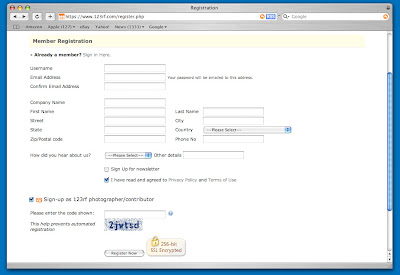
Go to 123rf.com (my referral link) & click on "Register".


  1. Fill-up the Member Registration form.
  2. REMEMBER! For chinese name, fill your surname in the "First name" box, ex. Chin King Kong, first name is "Chin" & second name is "King Kong".
  3. Click "Sign-up as 123rf photographer/contributor". Choose what type of payment you prefer (Paypal, Moneybooker or cheque) & the payment limit. You can always come back & change it.
  4. Fill-in what you see on the security code & press "Register Now".
  5. They will send a E-mail to you with your log-in password. Follow the instruction in the Email to upload your images & ID.
  6. Check your Email frequently & wait for the conformation.
There you go. Upload your stock & start to make money.

Please find out the file requirements before upload your stock.

How to submit to iStockphoto?

Go to iStockphoto.com (my referral link), because it's under my referral, the first page you will see my profile. Click on "Sign Up" button.


  1. At the "Join Us" page, file in the username you want & Email. Click "Sign Up".
  2. The "Membership Agreement" appear, click "I Agree".
  3. Check your Email. They will send you a Email with the password. Type in your username & the password given to log-in.
  4. Click on "Upload" at the side banner. A "Private Profile" page will appear. Fill in the particular info & click "continue" button.
  5. After that, the "Contributor Application - Getting Started" page appear.
  6. Choose what type of stock (image, flash, illustration/Vector or video) you wish to submit.
  7. Follow through the step-by-step training tutorial. At the end of the tutorial click "Continue to the Application".
  8. Fill out the Application Quiz. Answer all the questions and press "Submit".
  9. If you pass the quiz, you'll be asked to submit three images for approval.

Please find out the file requirements before upload your stock.

How to submit to Dreamstime?

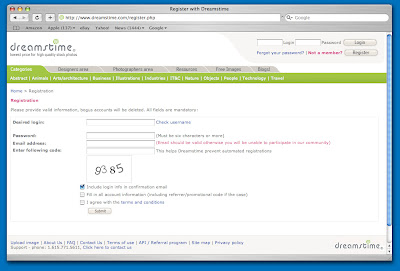
Go to Dreamstime.com (my referral link), because it's under my referral, the first page you will see my profile. Click on "Register" button.


  1. On-click the "Fill in all account information" & "I agree with the terms and conditions". Fill in the particular inform & click "submit".
  2. After that, another window with come up saying your account has been registered, don't bother the option about buy credit or subscription unless you want to buy stock. Check the top right corner of the window. See "Your email address is not confirmed. Please click here to confirm your email address."?
  3. Check your Email. They might send you the conformation Mail already.
  4. In your Email, click on the conformation link to verify your account.
  5. DONE. Ready to upload your stocks? Click on "management Area" & look for "Upload Images".

Please find out the file requirements before upload your stock.

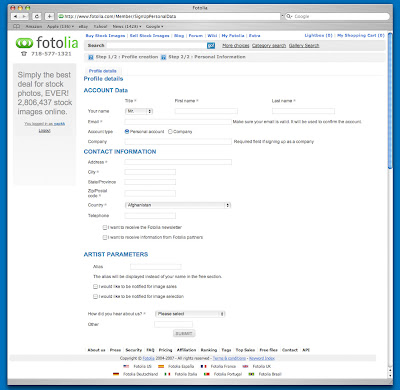
How to submit to fotolia.com?

Go to fotolia.com (my referral link). Click on "Sign up!" button.


  1. Fill in Login column with the username you want, password, conform password, on-click the "I accept the Terms and Conditions of the web site." & press "continue" button.
  2. The next window will be "Profile details" page. Fill in the necessary info & click on "submit". DONE.
  3. You can start to upload your stock now by click on "My Files" in the member page. 4 type of upload formats you can choose from. I recommend "Upload new files with normal form" the 1st one.
  4. In the "Upload new file" window, on-click ALL 4 Terms of use. Click "Choose File" button & select the file from your computer.
Please find out the file requirements before upload your stock.